How It Works
PostHog events flow in, lifecycle emails go out, engagement data flows back. The full loop in 10 minutes.
The full loop
Hogsend sits between PostHog and Resend. Events come in from PostHog, journeys react with emails via Resend, and engagement data flows back to PostHog. It's a closed loop — your product analytics and lifecycle email live in the same event stream.
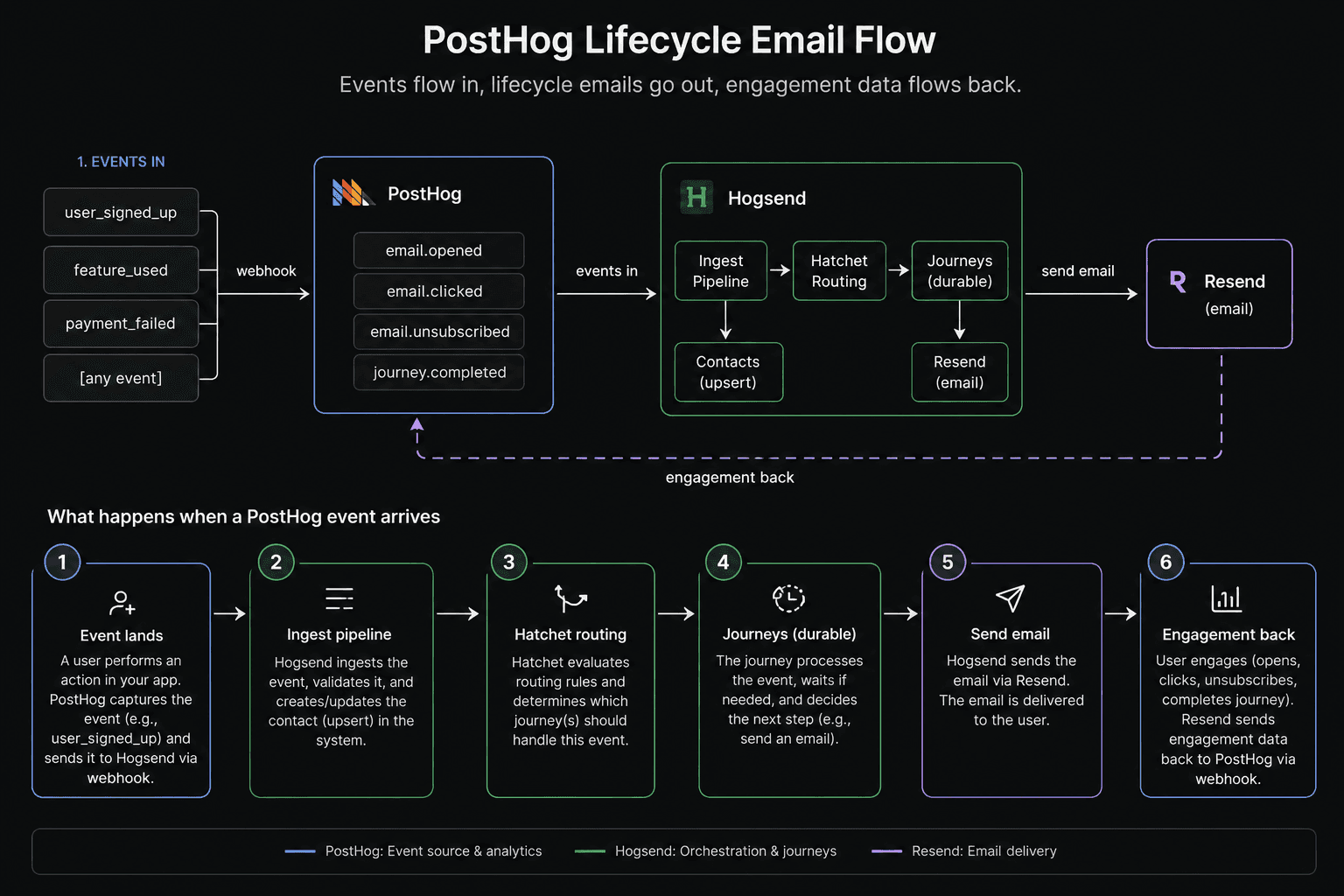
What happens when a PostHog event arrives
Let's trace a real example. A user signs up in your app, PostHog captures user_signed_up, and the webhook fires to Hogsend.
1. Event lands at the ingest pipeline
The PostHog webhook hits POST /v1/webhooks/posthog. Hogsend transforms the PostHog payload into an internal event — the event name stays the same (user_signed_up), the distinct_id becomes the userId, and person.properties.email becomes the userEmail.
2. Four things happen concurrently
- Store — the event is saved to the
user_eventstable with its properties and timestamp - Route — the event is pushed to Hatchet, which routes it to every journey whose trigger matches
user_signed_up - Exit check — any active journeys for this user are checked for exit conditions (e.g., if this user was in a "dormancy reactivation" journey, a new signup event might exit them)
- Contact upsert — a contact record is created or updated with the user's email and properties
3. The journey starts
If a journey like activation-welcome triggers on user_signed_up, Hatchet spins up a durable task. Before the run function executes, enrollment guards are checked in order:
- Is the journey enabled?
- Do the event properties match the trigger conditions?
- Has the user exceeded the entry limit?
- Is the user subscribed to emails?
- Is the user already active in this journey?
If all guards pass, a journeyStates row is created and the run function begins.
4. The journey executes
The journey sends a welcome email, sleeps for 2 days (durably — survives deploys), checks if the user activated, and branches accordingly. Each step updates the journey state in the database so you can see exactly where each user is.
5. Emails go out via Resend
When the journey calls sendEmail(), Hogsend renders a React Email template, generates a signed unsubscribe URL, sets List-Unsubscribe headers, and dispatches the email through a durable Hatchet task to Resend. The task retries automatically on transient failures.
6. Engagement flows back to PostHog
When the user opens the email or clicks a link, Resend fires a webhook back to Hogsend. Hogsend updates the email record (opened, clicked, bounced) and pushes the engagement event back to PostHog as a person property and event.
Now in PostHog you can:
- Build cohorts like "users who opened the welcome email but haven't used feature X"
- See email engagement in product funnels
- Target users with feature flags based on email interaction
- Watch session replays of what users did after clicking through
This is the loop that makes Hogsend valuable. Your lifecycle emails aren't in a silo — they're part of your PostHog analytics, informing product decisions alongside every other user behavior signal.
What Hogsend handles for you
Setting up lifecycle email from scratch means building a lot of plumbing. Here's what Hogsend gives you out of the box:
Event ingestion
- PostHog webhook source (built-in, 2-minute setup)
- Stripe and custom webhook sources
- REST API for direct event pushing
- Event deduplication via idempotency keys
Journey orchestration
defineJourney()with durable execution (sleeps survive deploys)- Automatic enrollment guards (entry limits, conditions, subscription checks)
- Declarative exit conditions evaluated on every incoming event
- Cross-journey triggers (one journey can start another)
- Journey registry with runtime enable/disable
Email delivery
- React Email templates with type-safe registry
- Resend integration with automatic retries and exponential backoff
- Tracked sends with open/click/bounce monitoring
- Automatic suppression after bounce threshold
- Signed one-click unsubscribe (RFC 8058 compliant)
- Preference center with per-category controls
Contact management
- Auto-created from events (no manual setup)
- Properties merged from PostHog person data
- Bulk import/export (CSV/JSON)
- Soft delete with full history preservation
- Activity timeline per contact
Operational visibility
- Admin API for contacts, journeys, emails, events
- Real-time metrics (journey performance, email deliverability, event volume)
- Alert rules with Slack, webhook, and email notifications
- Dead letter queue for failed tasks
- Audit logging on every admin mutation
Getting up and running
The whole point is speed. Hogsend is designed to go from zero to sending lifecycle emails in under 10 minutes:
- Clone and install (2 min) —
git clone,pnpm install,docker compose up -d - Configure (2 min) — copy
.env.example, add your Resend and PostHog keys - Connect PostHog (2 min) — add the webhook URL to PostHog's data pipeline destinations
- Start (1 min) —
pnpm dev+hatchet worker dev - Write your first journey (3 min) — use the example journeys as a starting point
You don't need to tightly couple anything to your existing infrastructure. Hogsend is a separate service that listens to PostHog events via webhook. Your app doesn't know it exists. You can spin it up, try it, and tear it down without changing a line of application code.
That's the beauty of it — you get the full benefits of lifecycle marketing (welcome sequences, trial nudges, churn recovery, payment failure handling, reactivation campaigns) without a 6-week integration project. Start scrappy, prove the value, and when you're ready for a bigger platform — or when PostHog ships their own — you've got clean data and proven journeys to migrate.